What Is Ycode?
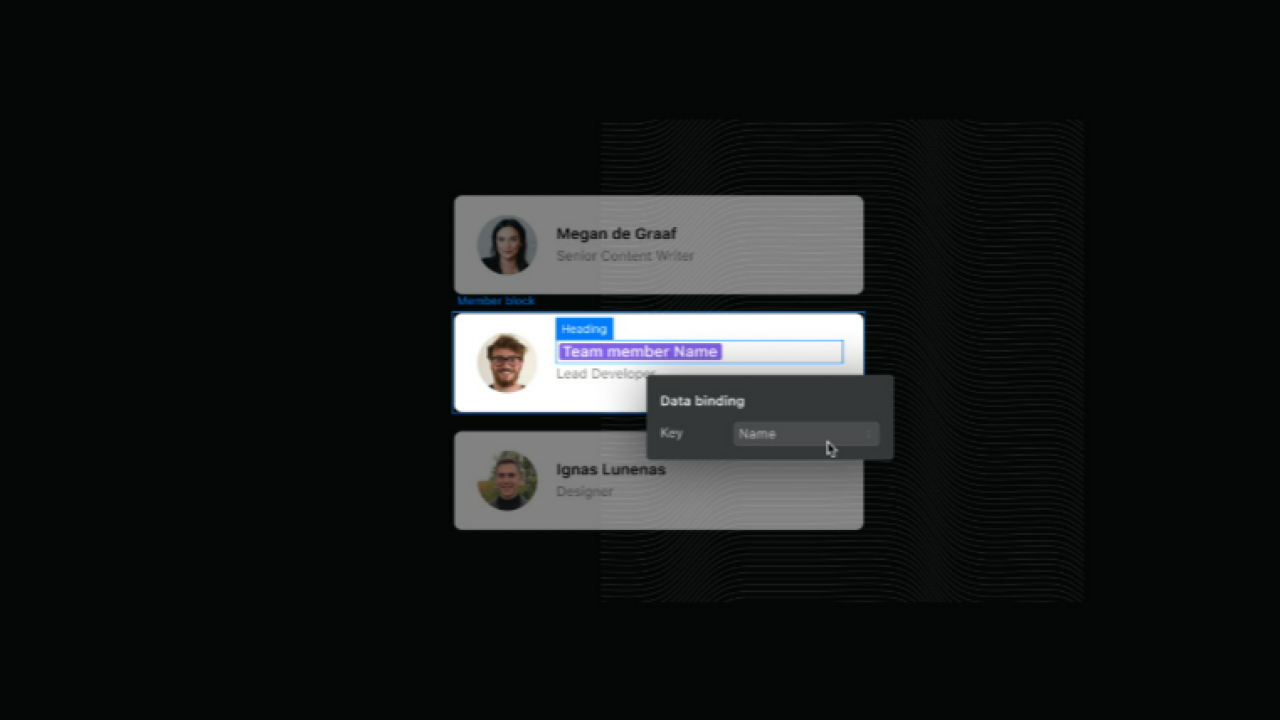
Ycode is a no-code web app builder that lets you create dynamic, data-powered websites—including fully functional directory sites—without writing a single line of code. Built on a modern visual development interface, Ycode gives you database functionality, user authentication, conditional visibility, and custom workflows—all in one browser-based platform.
What sets Ycode apart is its blend of design freedom and backend logic, making it a favorite among creators who need more power than traditional website builders offer, but who don’t want the complexity of full-scale development.
Ycode is backed by the same team behind MailerLite, so it comes with solid UX design, reliable hosting, and regular product improvements.
Who It’s Best For
Ycode is an ideal solution for:
-
Digital entrepreneurs creating niche directories (e.g., coach finders, affiliate product directories, local service hubs)
-
No-code makers who want total design control and dynamic databases
-
Startup founders building MVPs of directory-based platforms
-
Agencies or freelancers offering white-label directory builds
If you're looking to build a modern, mobile-friendly, SEO-ready directory without the bulk of WordPress or the lock-in of all-in-one directory software, Ycode is an excellent middle ground.
It’s especially appealing for users comfortable learning visual workflows and logic-based setups.
Standout Features for Directory Creators
1. Visual Database Builder
Create custom collections (like listings, users, categories) and define relationships without touching code. Everything is structured, filterable, and queryable—perfect for directory logic.
2. User Authentication & Permissions
Set up user accounts, gated content, and role-based access for members. You can create directories where users manage their own listings or unlock exclusive content.
3. Design Freedom
Unlike most directory themes or templates, Ycode gives you full design control. Build your layout from scratch or use pre-made components—without being locked into a rigid UI.
4. Conditional Logic & Workflows
Set actions like “Send email when listing is submitted” or “Show featured badge if X field is true.” These no-code automations make your site feel polished and smart.
5. SEO & Speed
Ycode websites are fast-loading, mobile-optimized, and SEO-friendly. You can manage meta tags, alt text, URL slugs, and even set up dynamic SEO structures for every listing.
6. Built-In Hosting & SSL
No need to purchase separate hosting or worry about performance—Ycode handles everything, including CDN delivery and free SSL certificates.
Pricing
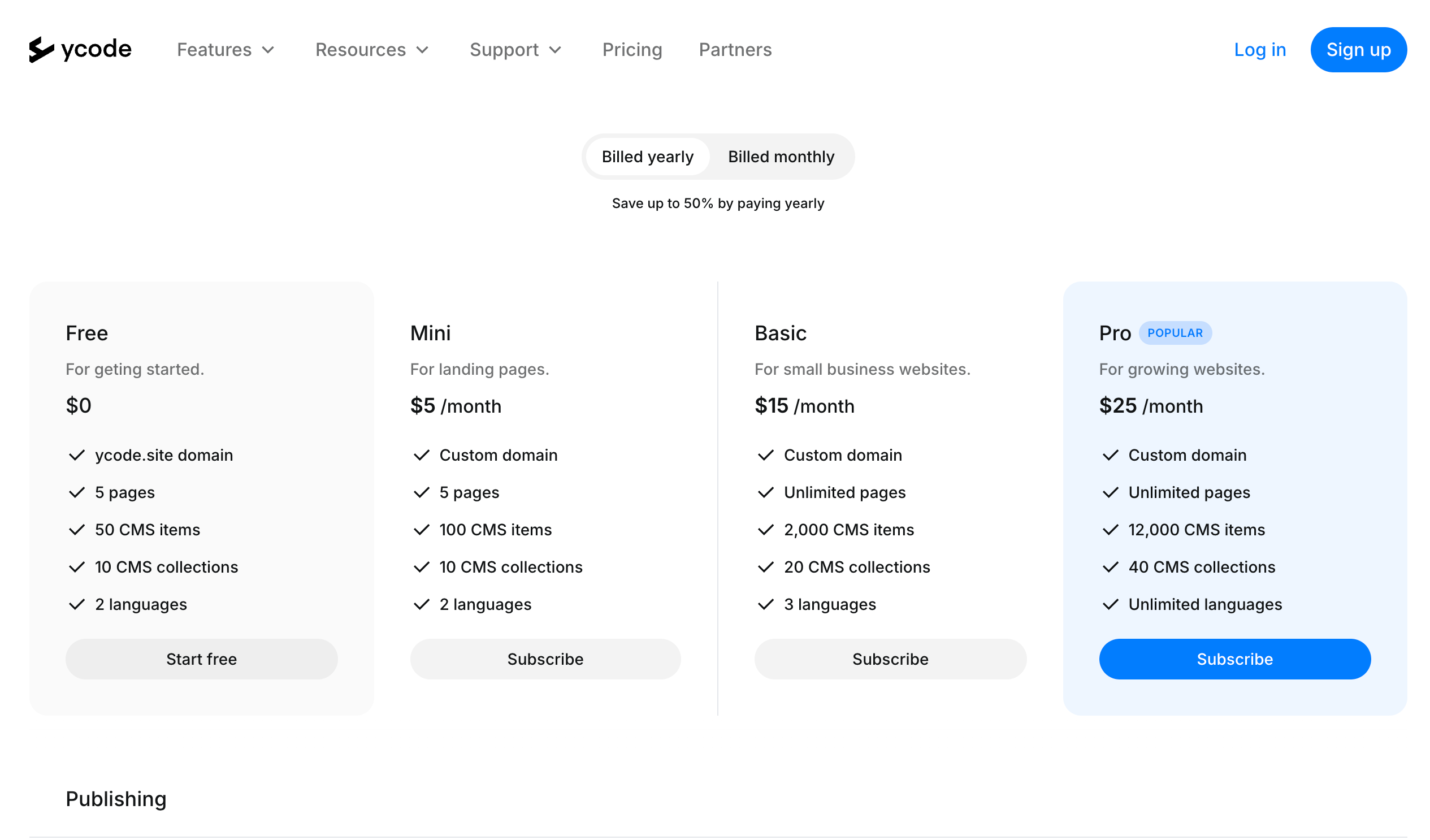
Ycode currently offers:
-
Free Plan: Includes 1 project, up to 2 database collections—great for testing.
-
Mini Plan ($5/month): For hobby or test projects with limited workflows.
-
Basic Plan ($15/month): Includes 10 projects, advanced logic, and custom domains.
-
Pro Plan ($25/month): White-label, 50+ projects, and unlimited team members.
For a serious directory build, most users will start with the Pro plan or above to unlock full user auth, database scaling, and custom workflows.
Growing Popularity in the No-Code Space
While Ycode is newer than legacy platforms like WordPress or Webflow, it has quickly gained traction in the no-code and indie hacker community. More makers are using Ycode to build directories, client portals, internal tools, and niche SaaS MVPs.
Its integration with tools like Airtable, Make, and Zapier makes it especially powerful for creators who value automation and scalable backends.
How Ycode Compares to Other Directory Software
vs. WordPress + Directory Themes
Ycode removes the plugin headaches and theme restrictions that often come with WordPress. While WP is more mature, Ycode is faster to launch, easier to maintain, and much cleaner in terms of UX.
Brilliant Directories is great for structured, monetized member directories—but it lacks modern flexibility and design freedom. Ycode gives you a blank slate and total control, but you’ll have to build the listing logic yourself.
vs. Webflow
Ycode is often compared to Webflow, but it goes further by offering native user authentication and workflows without external tools. Webflow still requires Memberstack, Outseta, or Wized to match Ycode's functionality.
Final Impressions
Ycode is a standout choice for creators who want a clean, modern, scalable directory—but who don’t want to be boxed into a rigid all-in-one system. It’s powerful enough for advanced users and friendly enough for no-code beginners with patience to learn the logic.
Check out Ycode here.
If you’re building a niche directory, membership site, or marketplace-style listing platform and want true ownership and creative control, Ycode might be your ideal tool.
And if you'd rather have it built for you, our Done-for-You Directory Build service includes custom Ycode builds tailored to your niche, with full automation and monetization setup.
👉 Explore Done-for-You Directory Builds