
How to Write Directory Listing Pages Google Will Index
Open the Pages report in Google Search Console on a new directory, and the biggest grey bar usually isn't an error. It's "Crawled - currently not indexed."
That status means Google visited the page, read it, and decided it wasn't worth keeping. Not yet, anyway.
On a directory, that's almost always the listing pages. And the fix isn't technical. It's what's on the page.
What the two "not indexed" statuses mean
Search Console has two statuses that look alike. They have different causes, so it's worth knowing which one you're looking at.
Discovered - currently not indexed. Google found the URL but hasn't crawled it yet. Google's own explanation is that it usually postponed the crawl to avoid overloading the site. On a new directory, this mostly means Google hasn't decided your site is worth crawling quickly yet. More internal links to those pages, a clean sitemap, and fewer junk URLs help.
Crawled - currently not indexed. Google crawled the page and chose not to index it. This is the one that matters for directories. Google says you don't need to resubmit these pages, and resubmitting doesn't change what's on them anyway.
One thing to keep in mind before you panic: not every URL is supposed to be indexed. In Google's words, "Non-indexed URLs can be fine," as long as you know why. A sorting URL or a filter combination being skipped is fine. Your listing pages being skipped is the problem.
Why directory listing pages get skipped
A directory is built from templates. That's the whole model: one template, hundreds of pages.
The catch is what Google sees when it crawls them. If 500 listing pages share the same layout and only the name, address and phone number change, those pages look almost identical to each other. They also look like the same business's page on Google Maps and Yelp, which Google already has.
So Google keeps the version it already trusts and skips yours.
Google's spam policies describe the extreme version of this. "Scaled content abuse" is generating many pages mainly to rank rather than to help people. Their examples include scraping feeds to produce pages and using AI to churn out pages without adding value. For product directories there's a second policy, "thin affiliation": affiliate pages that copy the merchant's own description without adding anything.
Most directories aren't spam. But a directory that imports 2,000 scraped rows and publishes them untouched looks a lot like those examples from the outside.
What a listing page needs
The test is simple: does this page tell someone something they can't get from Google Maps in five seconds?
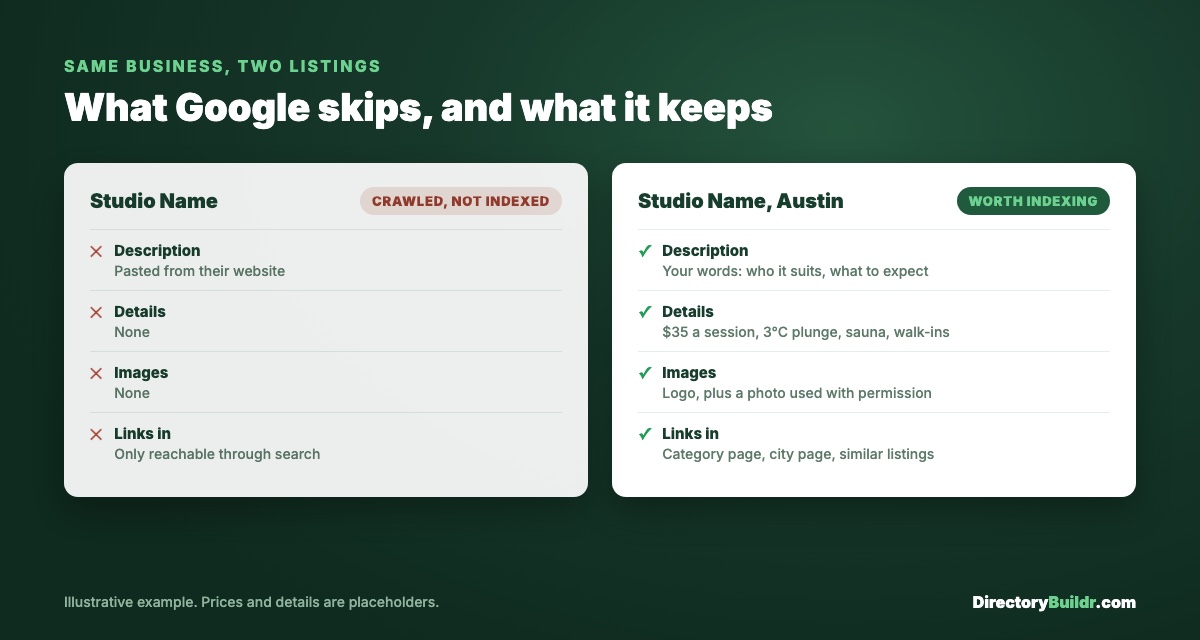
Here's the difference, using the sauna and cold plunge example from the niche research guide:
| Thin listing | Listing worth indexing |
|---|---|
| Name, address, phone | Name, address, phone |
| Description pasted from their website | A description in your own words: who it suits and what to expect |
| No details | Price per session, water temperature, sauna on site, walk-ins or booking only |
| No images | Their logo or a photo you have permission to use |
| Reachable only through search | Linked from its category page, its city page and similar listings |
| Title: "Studio Name" | Title: "Studio Name, Austin: Sauna and Cold Plunge Prices and Hours" |
None of that requires 1,000 words. It requires facts that are specific to that one business.
1. A description in your own words. Two short paragraphs is plenty. Say who the place suits, what's included, and anything a first-time visitor would want to know. Never paste the business's own About text. Google has already indexed that on their site.
2. Your niche fields, all filled in. Structured facts like price, temperature and booking rules are exactly what Maps doesn't show. They make the page different from every other copy of that business online. They also become your filters.
3. One thing you checked yourself. A price you confirmed, a note about parking, the date you last verified the details. It's small, but it's the part nobody can scrape.
4. Internal links in, not just out. Google finds and prioritizes pages through links. A listing that's only reachable through your search box is close to invisible. Link every listing from its category page and, if you're local, its city page. Then add a "similar listings" block so listings link to each other.
5. A title that says what the page is. The business name alone gives Google nothing to match a search to. Add the location and the category, plus whatever people search for in that niche (prices, hours, reviews).
6. Schema markup, if your platform supports it. LocalBusiness or Product schema helps Google understand the page. It doesn't force indexing, but it removes guesswork.
What to do with pages that aren't indexed
Start with the pages you most want to rank, not the whole list.
Improve the best ones first. Pick the 20 listings in your strongest category or city and bring them up to the standard above. Those pages are the ones most likely to be searched for.
Cut or merge the empty ones. Thin pages don't just fail on their own. They make Google spend its crawls on pages that will never rank. A city page with one listing, a category with nothing in it, a listing with no details at all: combine them, fill them, or set them to noindex until they're ready. Fewer, better pages beat a big site that's mostly skipped.
Then wait. After you improve a page, check it with the URL Inspection tool in Search Console. You can request indexing once, but Google re-evaluates on its own schedule, often over weeks rather than days. Clicking the button repeatedly doesn't speed it up.
The checklist
For every listing page you want indexed:
- A description in your own words, not copied from anywhere
- Every niche field filled in
- At least one detail you verified yourself
- Links from its category page, its city page (if local) and related listings
- A title with the name, location and category
- Schema markup, if your platform supports it
And for the site as a whole: no empty categories, no one-listing city pages, and no filter URLs in your sitemap.
If you're still building your first batch, how to get your first 50 listings covers which ones to add and what to put in them. Why learning SEO is non-negotiable covers the bigger picture. And if you'd rather have someone fix your listing pages for you, get in touch.