
How to Set Up Claim Listings on Your Directory
Every listing you add is a business that doesn't know it's on your site yet.
A claim changes that. The owner finds their listing, proves it's theirs, and takes over keeping it accurate. That's the first time a business has a reason to care about your directory.
It's also the first sales conversation you'll have with them, even if nobody pays anything that day.
What a claim actually does
A claim hands a listing from you to the business that owns it. In practice that means:
- The owner clicks "Claim this listing" on their page, or follows a link you sent them.
- They prove they own the business.
- Once approved, they get an account that can edit the listing.
- The listing shows as claimed, and often gets a verified badge.
That's it. The mechanics are simple. Verification is where it gets interesting.
Why set it up before you have traffic
It's tempting to leave claims until the directory is busy. Don't.
Owners fix your data for free. They know their hours, prices and photos better than any scraper. Every claimed listing is one you no longer have to check.
Owners share their listing. A business that just claimed a page is far more likely to link to it from its website or post it on social media. For a new directory, that's often where the first backlinks come from.
A claimed listing is a relationship. Once someone has an account, you can tell them how many people viewed their listing last month. That's the conversation that eventually turns into a featured listing or a paid upgrade, which the monetization guide covers.
How verification should work
The whole point of a claim is that the right person ends up in control. If anyone can claim anything, a competitor can claim a rival's listing and change the phone number.
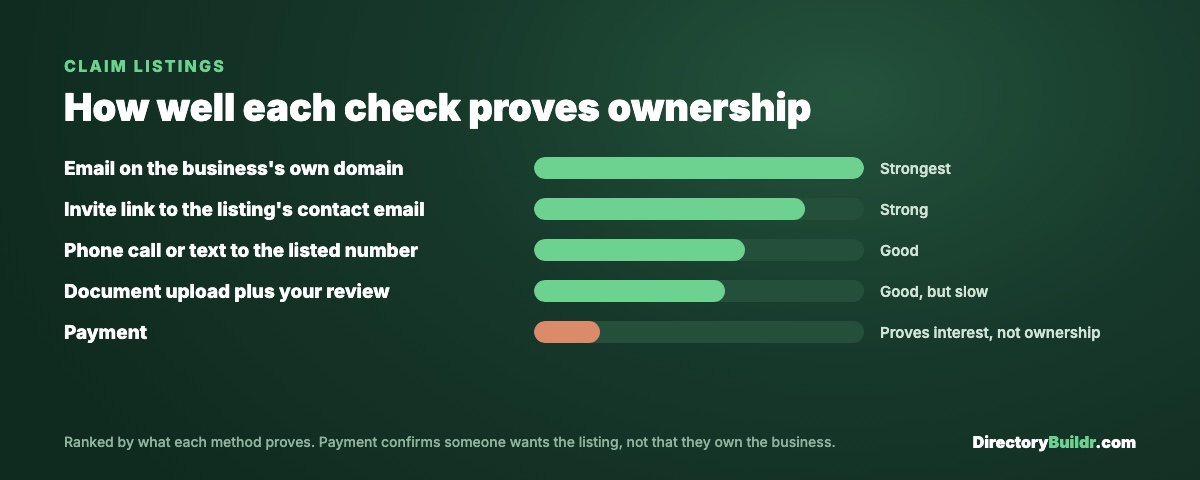
Here are the usual ways to verify, from strongest to weakest:
| Method | What it proves | Watch out for |
|---|---|---|
| Email on the business's own domain ([email protected]) | They control the business's email | Works only if the business has its own domain |
| Invite link sent to the listing's contact email | They control the inbox you have on file | Only as good as the email you scraped |
| Phone call or text to the listed number | They can answer the business's phone | Takes your time |
| Document upload (business licence, utility bill) plus manual review | Strong proof, checked by you | Slow, and you have to actually look |
| Payment | They want the listing | Proves interest, not ownership |
That last row is worth pausing on. Several platforms can approve a claim automatically once payment goes through. That's convenient, but a payment only proves someone wants the listing. It doesn't prove they own the business. If your niche has competitors who'd happily pay $50 to control a rival's page, keep a manual check on paid claims.
And treat claims from free email addresses (Gmail, Outlook) with a little extra care. Plenty of small businesses use them legitimately, so don't reject them outright. Just confirm by phone or with a document before you approve.
Free claims or paid claims?
Both work. The question is what you're charging for.
Free claims get you the most owners, the most data corrections and the most shares. Then you charge for upgrades: a featured spot, extra photos, a contact form, a verified badge.
Paid claims charge to take control of the listing at all. Directify, for example, suggests pricing a claim with a verified badge at $29 to $99 one-time. That can work once your directory sends real customers, because the owner is paying for something they can measure.
On a new directory with little traffic, I'd start free. A business that claims for free and gets value is much easier to sell an upgrade to later than one that was asked to pay before it had seen a single visitor.
The invite email
Most owners will never find their listing on their own. You have to tell them.
Keep the email short, specific and easy to act on. Something like:
Subject: Your studio is listed on [Directory Name]
Hi [Name],
I run [Directory Name], a guide to sauna and cold plunge studios in Austin. [Studio Name] is listed here: [link].
I've filled in what I could find, but you'll know better than me. You can claim the listing for free to correct anything, add photos, and see how many people view it.
[Claim your listing]
Thanks, [Your name]
Three things make that work. It names their business and links straight to the page, so it doesn't read like spam. It admits the listing might be wrong, which gives them a reason to click. And it costs them nothing.
Send it once, then once more about a week later to anyone who didn't respond. Stop there.
If someone replies asking to be removed, remove them the same day.
What owners get after they claim
Give owners enough control to keep the listing accurate, but not so much they can turn it into an advert.
Let them edit: hours, prices, description, photos, contact details and your niche fields (price per session, booking rules, whatever your directory tracks).
Keep for yourself: the category, the listing's position in your rankings, and anything that's your editorial judgement. If you write a "who it's best for" note, that stays yours.
And keep your niche fields required. An owner who claims a listing and then deletes half the details has made your page thinner, not better. What a listing needs to get indexed covers why those fields matter.
How the main platforms handle it
Most directory tools support claims, but they verify differently, so check before you rely on one:
- Directify has a bulk "Invite to Claim" action that emails each business a personal claim link. Claims through that link are verified automatically, and claims from anyone else go to proof of ownership and manual review. Paid claims run through Stripe, Lemon Squeezy, Creem or PayPal, and a completed payment approves the claim automatically.
- GeoDirectory has a Claim Listings add-on that can approve claims by email verification, on payment, or after you review them manually. Approving a claim transfers the listing to the new owner, and you can undo it.
- Directorist has a Claim Listing extension (from $29 a year for one site) with admin approval, a claimed badge, and free, fixed-fee or plan-based claims.
- Listeo handles claims by review, with an optional file upload so the claimant can attach proof.
Whichever you use, test the whole flow yourself with a listing you own before you send a single invite.
The checklist
- Claim button on every listing page
- A verification method that proves ownership, not just interest
- A manual check on paid claims if competitors could abuse them
- Free claims to start, paid upgrades later
- An invite email that names the business and links to its page
- One follow-up, then stop
- Owners can edit the facts, you keep the categories and rankings
- Niche fields stay required after a claim
If you haven't added your listings yet, your first 50 listings covers which ones to start with. And if you'd like a directory built with claims and upgrades set up from the start, get in touch.